How to get more highlight colors in word 2007, 2010, 2013, 2016,…

How to get more highlight colors in word? In a Word document, sometimes we desire to have highlighted and clear content, and we can achieve this by creating emphasis through changing the text color. Today’s article will guide you on how to change text color in Word 2007, 2010, 2013, 2016, and 365 on your computer, with the most detailed instructions.

– You should use Word’s text color change feature to make the content of the article attractive as well as clearly show the important content.

– This article is based on the Word 2016 version. Word 2007, 2010, 2013, 2019, 365 versions you can do the same.

How to change text color

Black out the paragraph that needs to be recolored
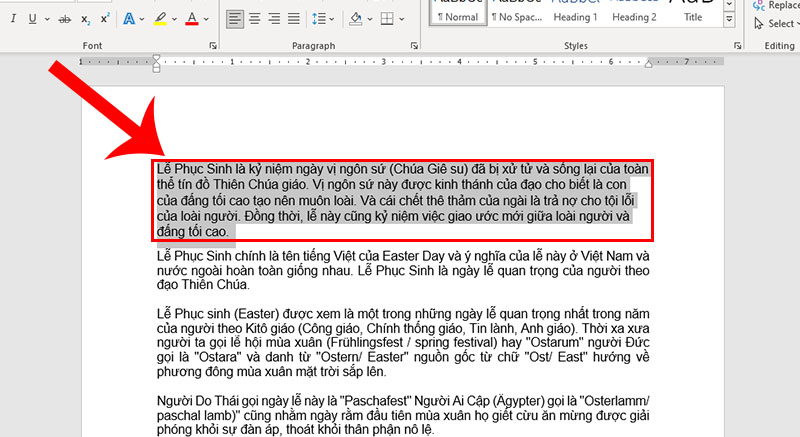
Black out the paragraph that needs to be recolored

Select the Font Color icon

On the home tab, tap the A icon > Choose a text color.
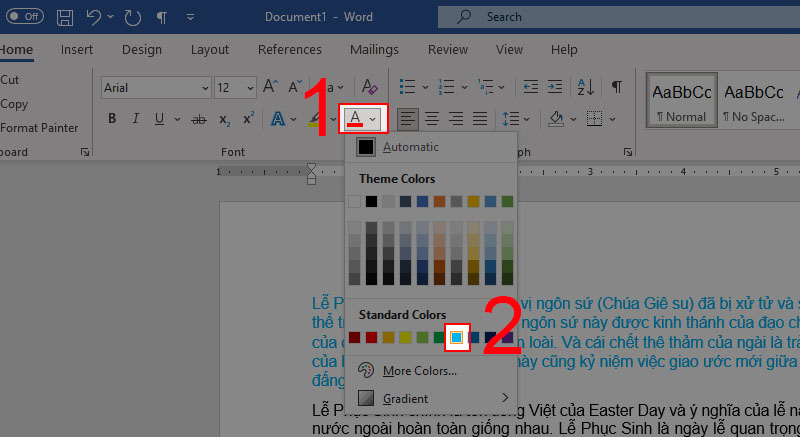
Select the Font Color icon

How to get more highlight colors in word

Black out the paragraph to highlight
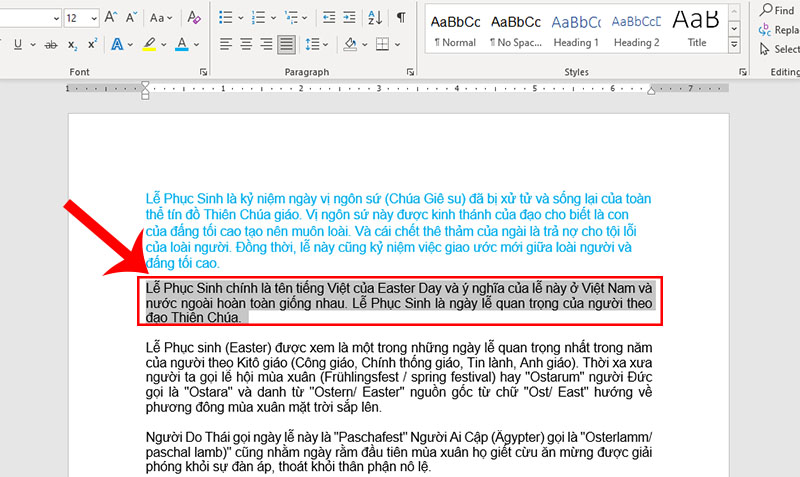
Black out the paragraph to highlight

Select the Text Highlight Color icon

On the home tab, tap the pen icon > Choose a highlight color.
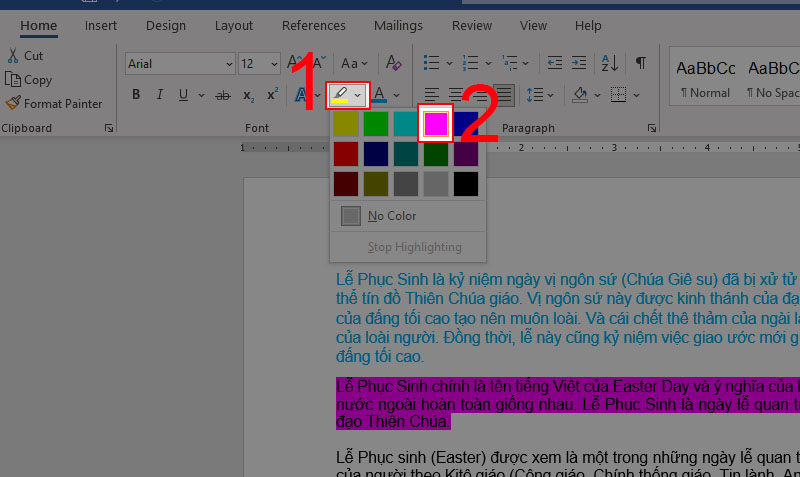
Select the Text Highlight Color icon

How to highlight text with text effects

Black out the paragraph to highlight
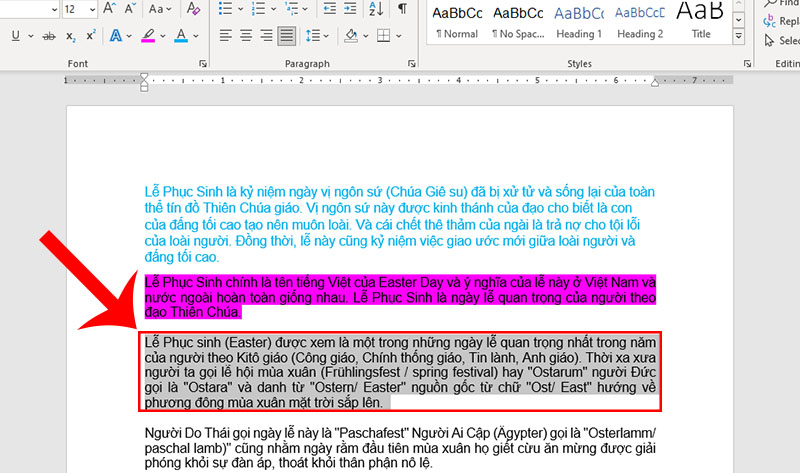
Black out the paragraph to highlight

Click the Text Effects and Typography icon

On the home tab, tap the big A icon > Choose the right effect.
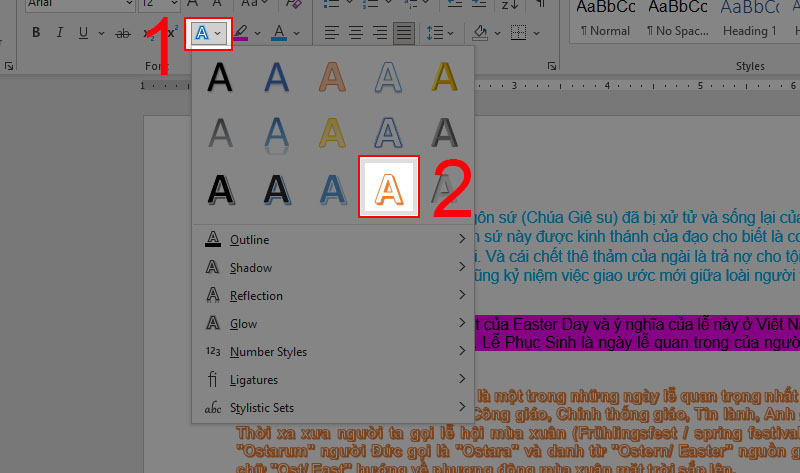
Click the Text Effects and Typography icon

Some frequently asked questions

Can the text color be restored to the default color?

Answer: Okay. We can do it by:

Black out text > Select the letter A (color) > Select Automatic as the default color.
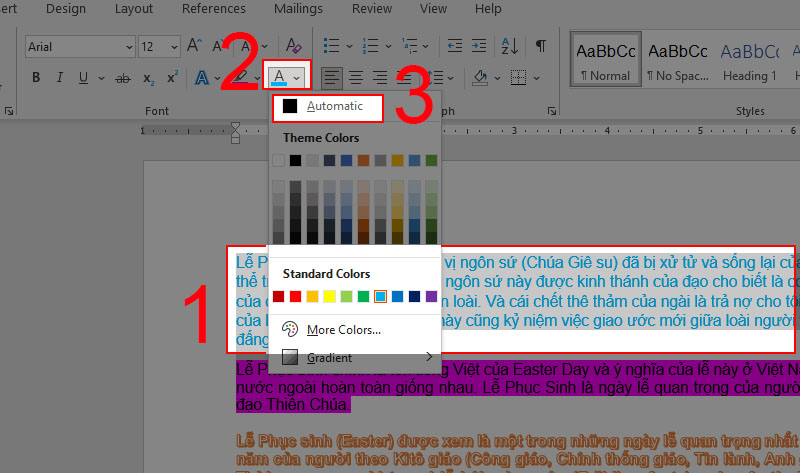
Can the text color be restored to the default color?

Can I remove highlight colors?

Answer: Of course.

Black out highlights > Select the pen > Select No Color.
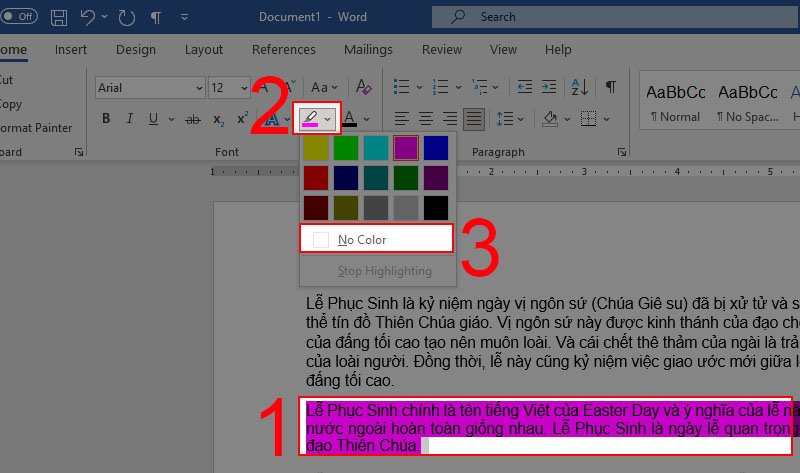
Can I remove highlight colors?

Can you remove the highlight text effect?

Answer: Of course.

Black out text that contains > effects Click clear formatting.
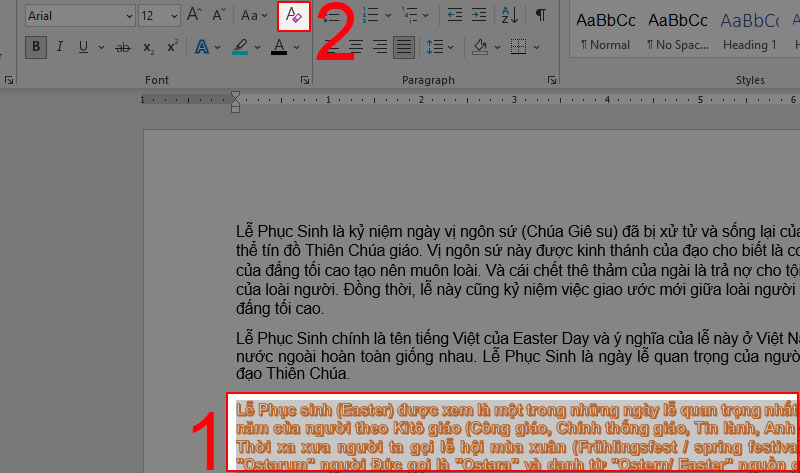
Can you remove the highlight text effect?

How to get more highlight colors in word? This article provides detailed instructions on how to change text color in Word 2007, 2010, 2013, 2016, and 365. You can apply these steps to all versions of Word on your laptop. Hope to see you in the next articles!

Related Posts

Cách cài đặt font chữ mặc định cho Word đơn giản, dễ thực hiện nhất 1

Cách cài đặt font chữ mặc định cho Word đơn giản, dễ thực hiện nhất

Trong quá trình soạn thảo văn bản, việc sử dụng một font chữ nhất quán và phù hợp không chỉ tạo nên tính chuyên nghiệp cho tài…

Giải Pháp Hiệu Quả Khi File Word Không Cho Chỉnh Sửa 5

Giải Pháp Hiệu Quả Khi File Word Không Cho Chỉnh Sửa

Trong quá trình sử dụng Microsoft Word, không ít người dùng gặp phải tình trạng file Word không cho chỉnh sửa, gây ra nhiều phiền toái và…

Khắc Phục Lỗi Ko In Được File Word: Nguyên Nhân và Giải Pháp Hiệu Quả 9

Khắc Phục Lỗi Ko In Được File Word: Nguyên Nhân và Giải Pháp Hiệu Quả

Việc in tài liệu là một phần không thể thiếu đối với dân văn phòng, sinh viên, và học sinh trong quá trình làm việc và học…

Hướng Dẫn Soạn Thảo Nội Quy Phòng Cháy Chữa Cháy File Word Đầy Đủ 13

Hướng Dẫn Soạn Thảo Nội Quy Phòng Cháy Chữa Cháy File Word Đầy Đủ

Phòng cháy chữa cháy (PCCC) là một trong những hoạt động quan trọng, có vai trò thiết yếu trong việc bảo vệ an toàn cho con người…

So Sánh 2 Bản Word Sự Khác Biệt Giữa Word 2016 và Word 2019 17

So Sánh 2 Bản Word Sự Khác Biệt Giữa Word 2016 và Word 2019

Phần mềm xử lý văn bản đóng vai trò quan trọng không chỉ trong công việc mà còn trong học tập. Trong số các phần mềm này,…

Những Cách Tách File Word Thành Nhiều File 22

Những Cách Tách File Word Thành Nhiều File

Microsoft Word là một phần mềm xử lý văn bản được phát triển bởi Microsoft, lần đầu tiên ra mắt vào năm 1983 dưới tên Multi-Tool Word…

Leave a Reply

Your email address will not be published. Required fields are marked *